AllStackd is live: one workspace for every Amazon SES account
I run a lot of domains on Amazon SES, so I built the control plane I wanted. Monitor every SES account, region and domain in one place, keep delivery in your own AWS account, and send transactional mail through an optional durable API. 14-day trial, no card.
~9 min read
Back in July I wrote about the AWS AI Get Certified Challenge for Central and Eastern Europe. I got in. The first month of Skill Builder is done — online training and the digital classroom. Live sessions start in October and run through the end of the year as I keep going on the AWS AI Practitioner path.
At some point reading about IAM and shared responsibility isn’t enough. I wanted to put what I’d learned so far into practice — on a real product, with real domains, in my own AWS account.
Here’s the result.
AllStackd went live on 30 Sep 2026. It’s an Amazon SES control plane for every product. You monitor every SES account, region and domain from one workspace. Delivery stays in your own AWS account. And when you want it, there’s an optional durable API for transactional mail.
AllStackd is not an email host and it doesn’t replace SES. AWS delivers the mail and bills the sends. AllStackd bills the workspace.
Why I built it
I have a lot of domains. Side projects, experiments, sites that need a welcome email, a password reset or a receipt. I was already deep in the AWS CEE learning track, so Amazon SES was the obvious place for their mail: pay-as-you-go, no contract, and delivery in an account I own.
SES is great at sending. The pain is everything around it:
- Sandbox status is per AWS Region. A new SES account starts in the sandbox, where you can only mail verified addresses, max 200 messages per 24 hours and 1 per second. Production in
eu-central-1doesn’t mean production inus-east-1. - DKIM breaks quietly. Someone edits DNS, one of the three Easy DKIM CNAMEs disappears, and you find out when a user says they never got the email.
- The console is one account at a time. The SES account dashboard and reputation page show health for one AWS account. With several products and regions, “check every account by hand” becomes the risk.
The AWS AI Practitioner program isn’t an email course. But it expects familiarity with IAM, the shared responsibility model and AWS pricing models. Those three ideas are exactly what AllStackd is built on: a scoped IAM role instead of keys, your account stays yours, and AWS bills AWS usage.
So I built the layer I wanted for my own domains, then shaped it for other indie developers like me.
What AllStackd is
AllStackd operates the layer above SES. Your AWS account remains the delivery system. AllStackd is the health view, the policy gate, and an optional sending API.
It has two operating modes:
| Mode | What it does |
|---|---|
| Observe | See SES identities, DKIM, SPF, DMARC, sandbox status, quotas and reputation without routing email through AllStackd. Read-only against SES configuration and reputation APIs. |
| Control | Add a durable, policy-enforced sending layer project by project, with idempotency, suppressions and short retention. Delivery still happens in your AWS account. |
Health findings come with a next safe action: DKIM drift, sandbox and quota issues surface in the dashboard before the next release.
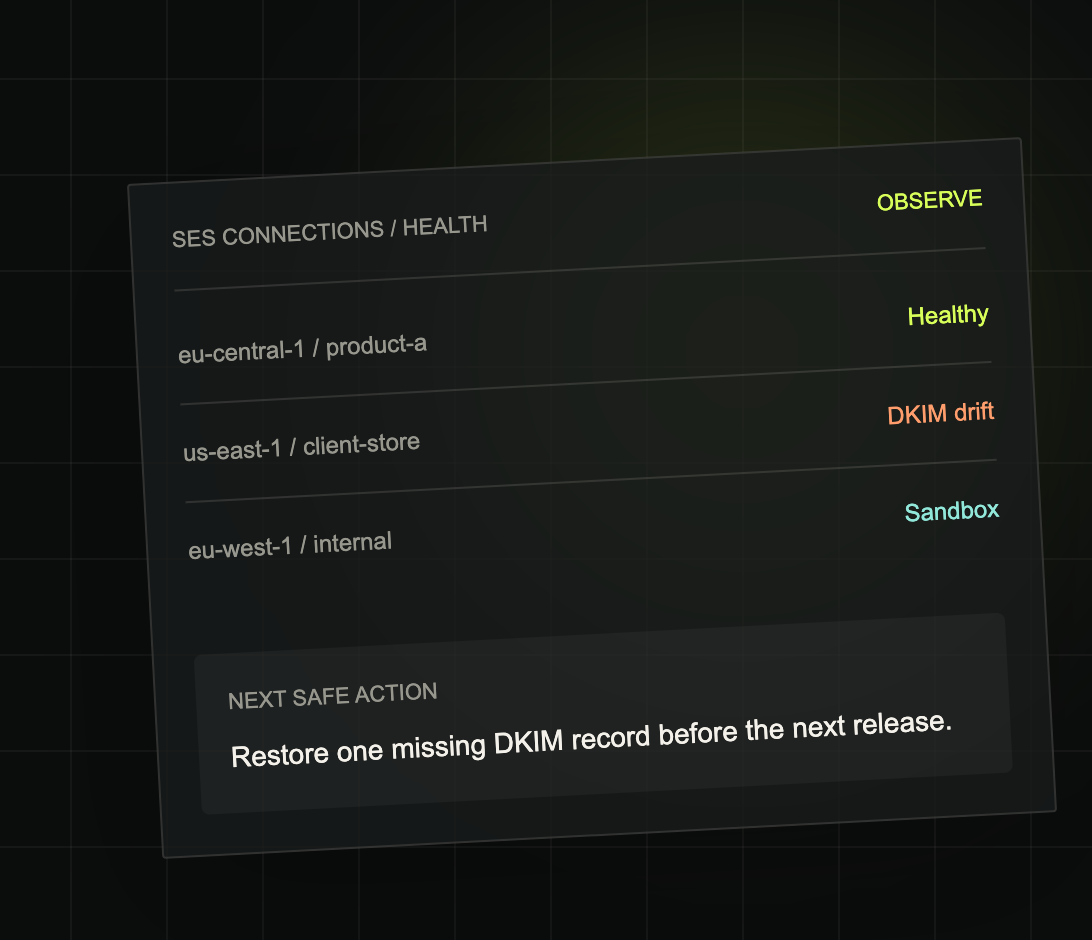
Observe mode: health across SES connections — Healthy, DKIM drift, Sandbox — plus a next safe action.
What the site compares it to:
| Amazon SES alone | SES + AllStackd |
|---|---|
| Operate accounts and regions separately | One workspace across SES connections |
| Manual identity and DKIM checks | Health findings with a next safe action |
| App-specific SES credentials | Project-scoped API keys |
| DIY queue and retry logic | Durable Control-mode sending workflow |
How it works
Setup takes four steps.
- AWS + SES. Verify a domain you own in SES (Easy DKIM CNAMEs, plus SPF and DMARC). Request production access when you’re ready to mail real users. AWS reviews that request, not AllStackd, and AWS says it gives an initial response within 24 hours.
- CloudFormation role. In AllStackd → Settings, create a connection and download the template. In AWS CloudFormation: Create stack → With new resources → Upload a template file. Paste the
RoleArn,SnsTopicArnandConfigurationSetNameoutputs back into AllStackd, then confirm the SNS subscription. - Domain health. Confirm DKIM, SPF and DMARC on the Domains page. Owned domains only, no Gmail or Outlook as the From domain.
- Optional Control API. Create a project, assign the connection, mint an
as_API key and send with an idempotency key.
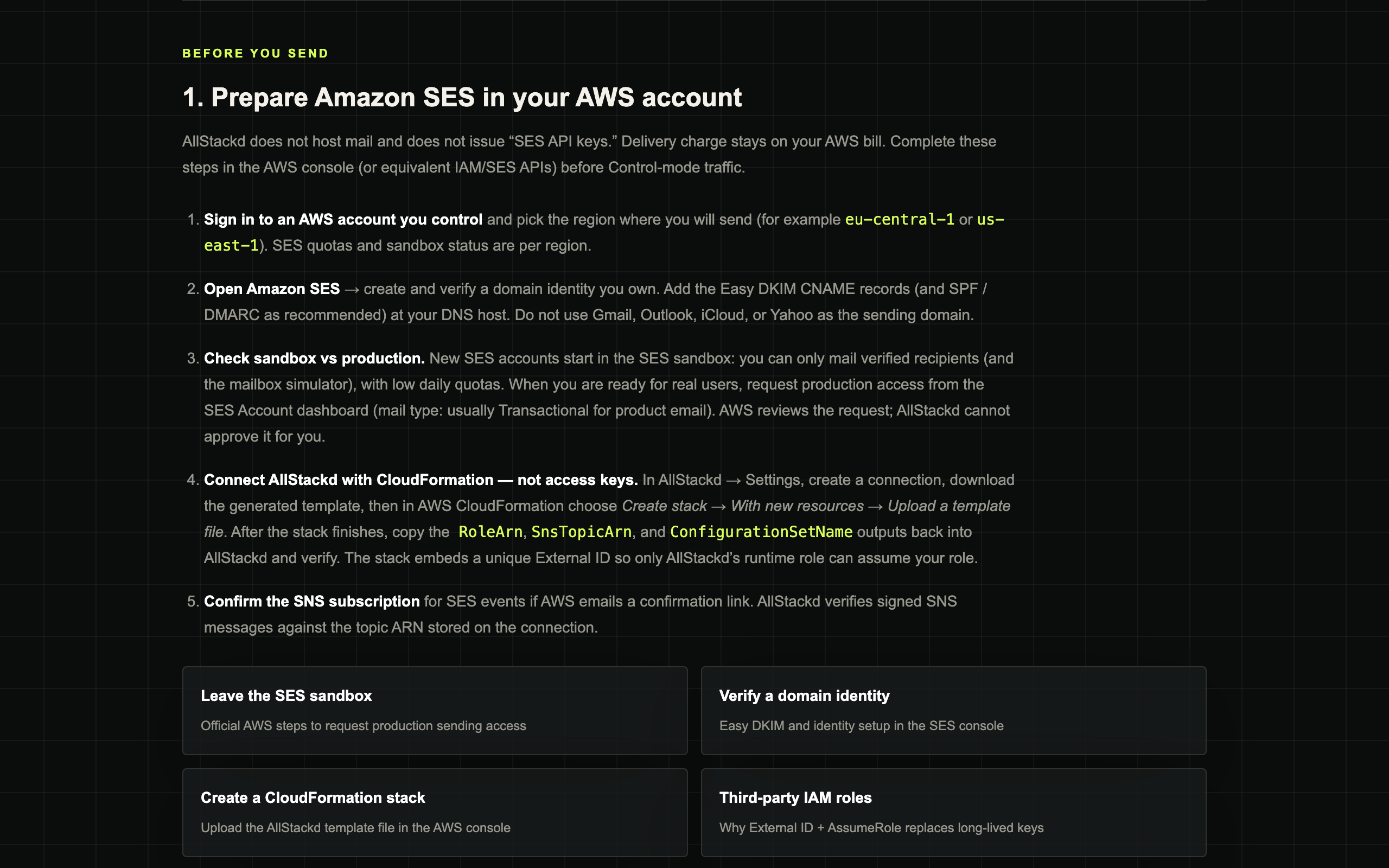
Docs: prepare SES in your AWS account, then connect with CloudFormation — not long-lived keys.
A send looks like this:
curl -X POST https://allstackd.com/api/v1/emails \
  -H "Authorization: Bearer $ALLSTACKD_API_KEY" \
  -H "Idempotency-Key: welcome-user-42" \
  -H "Content-Type: application/json" \
  -d '{
    "from":"hello@your-verified-domain.com",
    "to":["customer@example.com"],
    "template":{"alias":"welcome","variables":{"first_name":"Ada"}}
  }'
A few details I care about as a builder:
202means queued, not delivered. PollGET /api/v1/emails/:idor use a signed webhook (HMAC-SHA256) for send, delivery, bounce, complaint and reject events.- Templates start from starters (welcome, verify-email, password-reset, magic-link, receipt) or raw HTML, with
{{variables}}so copy can change without a deploy. - Up to 50 recipients per request, and retries with the same
Idempotency-Keyare safe. - TypeScript SDK file you copy into your app, plus an OpenAPI spec at
/openapi.json. - MCP beta at
https://allstackd.com/api/mcp: your coding agent can list domains, manage templates and queue a send with the same scoped API key.
What stays in your AWS account
This was the part I wouldn’t compromise on.
- No long-lived access keys, no SES SMTP passwords. The CloudFormation stack creates an IAM role that trusts only AllStackd’s runtime role, conditioned on a unique External ID per connection. Sessions last at most one hour.
- Observe is read-only. The permission list is published on allstackd.com/security, and you can review the template before you create the stack.
- Control is honest about scope. Today it includes
ses:SendEmailplus identity and configuration-set management. Narrowing send by configuration set or From address is on the hardening roadmap. If you only need health, start with Observe. - Message content is short-lived. In Control mode, payloads are encrypted at rest (AES-256-GCM) while queued and deleted within 24 hours. API keys are hashed and shown once.
- If AllStackd is down, mail SES already accepted keeps delivering in your account. Control-mode sends wait in the durable queue and are retried.
Pricing
Every plan includes Observe and Control. An SES connection is one AWS account in one region. Recipients/month count Control-mode recipients submitted through AllStackd; Observe doesn’t meter mail you send outside AllStackd.
| Plan | Monthly | Yearly | SES connections | Control recipients/month | Signed webhooks |
|---|---|---|---|---|---|
| Portfolio | €9 | €89 | 1 | 100k | 1 |
| Studio (best fit) | €29 | €289 | 5 | 500k | 5 |
| Agency | €79 | €789 | 25 | 2m | 20 |
- 14-day trial, no card during the trial. After 14 days, checkout is required to keep access.
- Agency is one operator managing many client connections. Team seats aren’t part of this beta.
- Prices exclude Amazon SES / AWS charges and may exclude tax. Signup is open worldwide.
- AllStackd is a paid beta: there’s no SLA yet.
AWS bills the sending separately. As of Sep 2026, new SES accounts start on the Essentials plan at $0.16 per 1,000 emails (first 10M/month), and you can switch to à-la-carte at $0.10 per 1,000 outbound (Amazon SES pricing).
Who it’s for
The site names four groups:
- Founders and studios: track identities, quotas, sandbox state and reputation across the products you operate.
- Agencies: separate client AWS access and see health issues before campaigns or releases.
- Freelance developers: keep each client’s SES account apart and catch DKIM or sandbox issues first.
- SaaS teams: watch quotas, bounces and domain health for the transactional mail your product already sends.
And who doesn’t need it, in the site’s own words: one SES account, one product, low volume — stay in the Amazon SES console. I mean that. AllStackd fits when you run several products, regions or client AWS accounts.
For me, that’s the vibe coder with a handful of domains and several side projects, each needing its own mail. I’m a solo developer in Hungary, and AllStackd is built for people who work the same way.
Running more than one product on SES?
Start the 14-day trial (no card) and connect one account in Observe mode first. Founder-assisted setup is available.
Open allstackd.com →Your turn — get started
One path from trial to first health check (and optional send).
-
Verify a domain in Amazon SES
Easy DKIM, SPF and DMARC on a domain you own.
-
Request production access
For that region when you’re ready for real recipients. Sandbox is per region.
-
Start the 14-day trial
Sign up at allstackd.com. No card during the trial.
-
Connect with CloudFormation
Settings → create a connection → download the template → create the stack in your SES region → paste
RoleArn,SnsTopicArn,ConfigurationSetName→ confirm the SNS subscription. -
Check Domains health
Confirm DKIM / SPF / DMARC in Observe mode.
-
Optional Control send
Create a project, mint an
as_key, send a test email. -
Stuck or found a bug?
Read allstackd.com/docs, email support@allstackd.com for founder-assisted setup, or reply to the newsletter. Share with a friend who runs more SES accounts than they check.
If you only remember one line: SES delivers. AllStackd operates.
FAQ
What is an Amazon SES dashboard?
The built-in one is the SES console's account dashboard: sending activity, quota used, bounces and complaints for a single AWS account, with sandbox status per region. A third-party SES dashboard like AllStackd sits on top of that and pulls identities, DKIM, SPF, DMARC, sandbox status, quotas and reputation from several SES accounts and regions into one workspace, while delivery stays in your AWS account.
How do I monitor multiple Amazon SES accounts in one place?
Connect each AWS account and region to one monitoring layer instead of logging into every console. In AllStackd, each connection is one AWS account in one region, added through a CloudFormation-created IAM role with a unique External ID, not access keys. Observe mode then shows identity health, DKIM drift, sandbox status, quotas and reputation for all connections in one view. Portfolio covers 1 connection, Studio 5, Agency 25.
Is AllStackd free?
No, but there's a 14-day free trial and no card is required during it. After the trial, checkout is required to keep access. Plans are Portfolio at €9/month or €89/year, Studio at €29/month or €289/year, and Agency at €79/month or €789/year. Every plan includes Observe and Control. Amazon SES sending charges are billed separately by AWS, and prices may exclude tax.
Does AllStackd replace Amazon SES?
No. AllStackd is not an email host. Messages are delivered by Amazon SES in your own AWS account, and AWS bills you for those sends. AllStackd is the operations layer on top: a health view across accounts and regions, plus an optional Control-mode API that queues transactional email with idempotency and suppressions before submitting it through your SES account.
Do I need to give AllStackd my AWS access keys?
No. You download a CloudFormation template from AllStackd, create the stack in your AWS account, and paste back the role, SNS topic and configuration set outputs. AllStackd assumes that role with a unique External ID, and sessions last at most one hour. It never asks for long-lived access keys or SES SMTP passwords. Observe mode is read-only; Control mode adds sending permissions.
How do I get out of the Amazon SES sandbox?
Request production access in the SES console: Account dashboard → View Get set up page → Request production access. Choose Transactional or Marketing, add your website URL, and confirm you only mail people who asked for it and handle bounces and complaints. AWS says it sends an initial response within 24 hours. Sandbox status is per region, so repeat this for every region you send from.
How much does Amazon SES cost in 2026?
As of Sep 2026, new SES accounts start on the Essentials plan at $0.16 per 1,000 emails for the first 10 million per month, with no monthly fee. À-la-carte outbound is $0.10 per 1,000, and attachments add $0.12 per GB. Pro ($105) and Enterprise ($500) plans add a per-account, per-region monthly fee. New AWS customers can get up to $200 in Free Tier credits.
Sources: AllStackd · Amazon SES pricing · AWS Certified AI Practitioner.
Disclosure: AllStackd is my product (paid beta with a 14-day trial). No affiliate links in this post.
Questions? Get in touch — or subscribe for the next ship notes.