I tried to break Prisma Postgres and Compute with a live app. Here's the honest bill
A live app, 10,000 votes in 51 seconds, zero server errors, and the bill at list prices. What held up, what didn't, and who should pick Prisma over Neon, Supabase or Vercel. Plus the Cursor, Claude Code and Codex setup.
~15 min read
Sponsored by Prisma. Links to Prisma carry tracking. Try Prisma CTAs use my partner link, so Vibe Coder's Life may earn a reward if you sign up. Numbers below come from my own test runs.
I wanted to know whether Prisma's new platform can run a real app, not a demo that works once on a laptop. So I built one. StackDuel is a swipe game for people who build with AI: Claude Code or Cursor? Free tier or paid from day one? You pick blue or red, see the live split, and tool duels move a public ranking. It needs a real database, concurrent writes, a live feed and a host — exactly the things that break.
Over four days I put the stack through deploy, preview branches, cold starts, backups and a 10,000-vote load run. Votes stayed correct, the bill stayed tiny (about 100,000 operations for the whole test), and the agent tooling was strong enough that I would put a real TypeScript app here — from a vibe-coded build through a production team app. Below is the evidence, the honest caveats, and the free setup guide.
Get the free Prisma + AI agents setup guide
Step by step for Cursor, Claude Code and Codex, plus the full AGENTS.md rules file I used so agents write Prisma 8 code. Enter your email and I will send it.
You'll also join the Vibe Coder's Life newsletter. Unsubscribe anytime.
What Prisma is (in one breath)
Prisma started as a TypeScript ORM. In 2026 it is a small platform, and four pieces matter for this test:
- Prisma ORM 8: the typed data layer. Version 8 is still a release candidate (
8.0.0-rc.33when I pinned it for this test;npmlatest moved to8.0.0-rc.34on 16 Nov 2026). Agents trained on Prisma 5 to 7 will guess wrong unless you give them skills and rules. Good news if you are on Prisma 7 today: ORM 8 can read an existing Prisma 7schema.prismaon PostgreSQL, so you can move queries over one file at a time instead of a big-bang rewrite. - Prisma Postgres: managed PostgreSQL 17 with connection pooling on every plan and daily backups on paid plans. You pay for operations and storage, not an instance size, and idle databases cost nothing.
- Prisma Compute: hosts TypeScript apps (Node.js, Bun, Next.js) next to the database in the same project. Generally available since August 2026, with a free plan and isolated preview environments per branch.
- Prisma Composer: describes the app and the database together, so one command,
prisma deploy, ships both.
Worth knowing on the product map: Accelerate retires 1 Dec 2026 (pooling stays on Prisma Postgres; query caching has no drop-in replacement), Optimize is replaced by Query Insights, and older Pulse APIs are gone. My AGENTS.md tells agents not to reach for those.
What I built: StackDuel
StackDuel has 100 duels in 8 packs and 27 tools to rank. No accounts: a cookie makes sure each person votes once per duel. It is Next.js 16 on Bun, with one raw-SQL transaction per vote, and rankings stream to every open tab live. I built it with Claude Code and Cursor, using Prisma's Prisma 8 skills so the agents stopped writing old Prisma code.
The public demo at the live StackDuel URL is the production app for real visitors. The 10,000-vote run was not against that production database — it hit a separate loadtest environment with its own Postgres and Compute service, so the public rankings stay clean while I hammered concurrency. If you open the live site and see on the order of a hundred votes, that is expected.
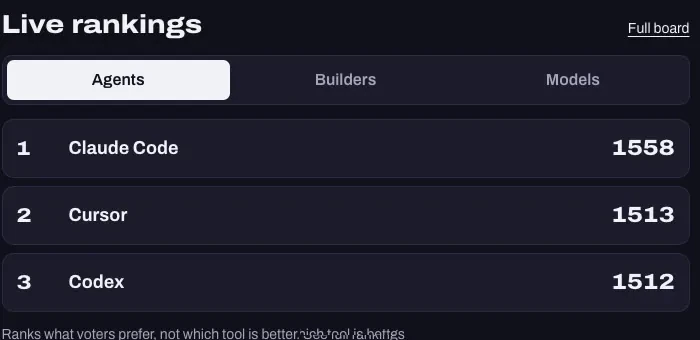
I also cast one real vote on the live site while the page was open, to check the live feed:
How a vote works (why this is a fair database test)
Prisma 8 RC has no atomic increment I could use, so each swipe is one parameterized raw-SQL transaction:
- Insert the vote row (unique per voter + duel).
- Bump the duel counters.
- Lock both tools in a fixed order (avoids deadlocks when duels share tools).
- Update both Elo ratings.
That is concurrent writes on shared rows, with a correctness check after every run: counters must match the vote table. If the platform drops or double-counts a vote, the test fails. It held.
What I tested
Everything here comes from my own test log. These are test results from one client, not vendor benchmarks.
| Setup | Detail |
|---|---|
| App | StackDuel: Next.js 16.4.2 on Bun 1.4.4, one raw-SQL transaction per vote |
| Prisma | Prisma ORM 8.0.0-rc.33 (release candidate; npm latest was 8.0.0-rc.34 as of 16 Nov 2026), Prisma Composer 0.38.0, Prisma Postgres (PostgreSQL 17) |
| Hosting | Prisma Compute, Frankfurt (eu-central-1) |
| Plan | Pro (list-priced below; this review is sponsored) |
| Client | One Mac in Budapest |
| Test | What I did | Result |
|---|---|---|
| Correctness | 20 simultaneous votes from one voter; a forced failure mid-vote; 200 votes on duels that share tools | 1 counted, 19 duplicates; the failed vote left nothing behind; 0 deadlocks. Counters matched the vote table after every run. |
| Load | 10,000 votes, 64 in parallel, Budapest → Frankfurt, against the separate loadtest environment |
51 s, 195.6 votes/s. p50 227 ms, p95 674 ms, p99 1.3 s. All HTTP 200, 0 server errors. |
| Worst case | 200 voters hitting one duel at the same instant | 3.3 s total, p50 2.2 s. All 200 counted exactly once. |
| Warm latency | 100 sequential requests per path | p50 24 to 35 ms for the API and the server-rendered home page. |
| Cold start | First request after about 18 hours idle | 1.0 s for the health check, 1.3 s for the page. After 17 minutes idle: 0.5 s, no restart. |
| Deploys | CLI and GitHub | First deploy 51 s. Git push to live preview about 2 min. |
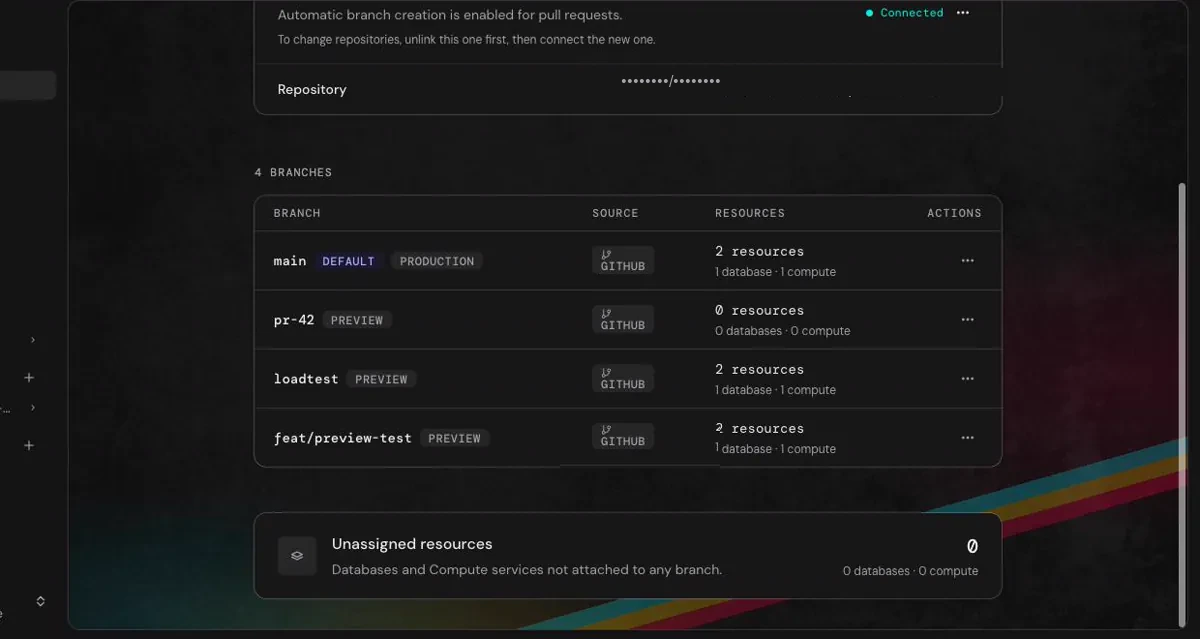
| Previews | Each branch gets its own fresh database | Migrations applied, production data not copied. Own URL, gone about 12 s after deleting the branch. A test vote on a fresh preview started from 1500 while production kept its own numbers. |
| Live feed | 10 Chrome tabs on the live stream for 10 minutes | 0 errors, 0 reconnects, about 213 updates per tab. |
| Backups | Pro plan | 8 backups listed, 7-day retention. I did not run a restore. |
Onboarding and the AI tools
Onboarding was smooth. Getting from a new account to a first live URL did not need a support ticket. Prisma also sends regular product emails, and you can book a call with the team — a nice touch for a one-person project.
The AI integrations were just as quick. The step-by-step version is in the free setup guide:
- Claude Code: the Prisma plugin adds MCP servers and Prisma 8 skills. The hosted server (
Prisma-Remote) works after OAuth. I used it to read logs, set an environment variable and trigger a rollback. Destructive actions waited for approval in the Console. - Cursor: reads the same Prisma 8 skills from the project, plus an
AGENTS.mdrules file, so the agent writes Prisma 8 code instead of the Prisma 5 to 7 code in most tutorials. - Codex: Prisma publishes a Codex plugin (
codex plugin marketplace add prisma/codex-plugin) and Codex readsAGENTS.mdnatively. - GitHub: install the Prisma GitHub App from the Console, connect the repo with one CLI command, and pushed branches deploy as previews.
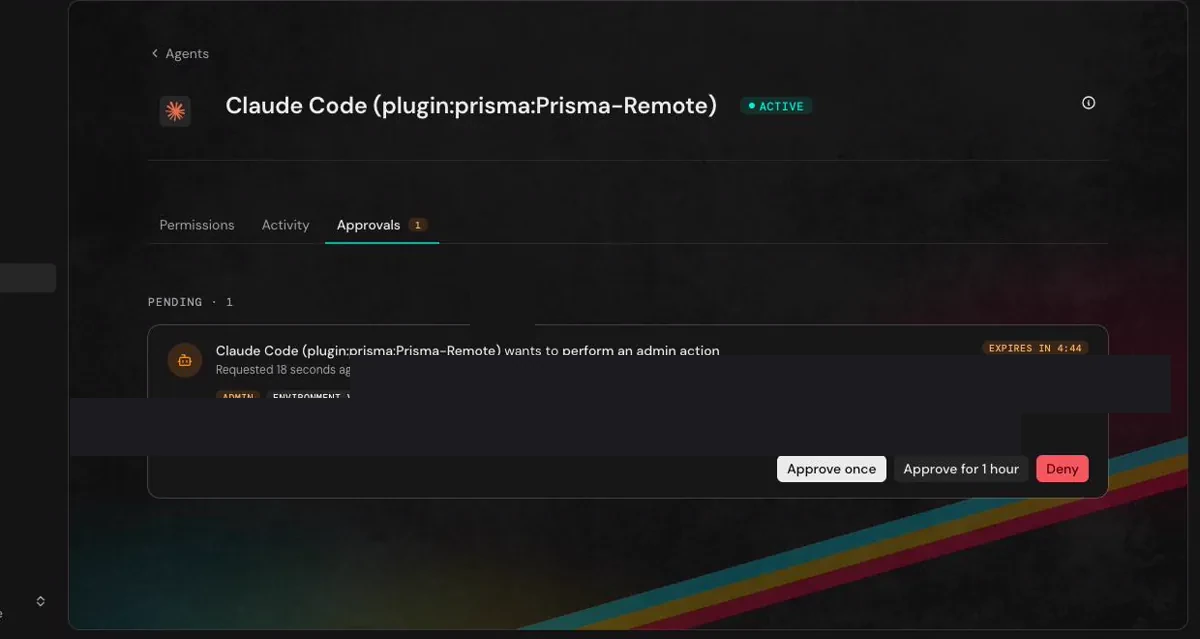
- Agent identity: coding agents can enroll with their own credentials (Console → Settings → Agents), so their actions show up separately in the audit log. By default they can move on preview branches and ask before production changes, deletes or connection strings.
The part I liked most: when Claude Code asked the MCP server to delete an environment variable, it did not just happen. The request showed up in the Console as an approval with "Approve once", "Approve for 1 hour" and "Deny".
Deploying: the CLI and GitHub, both tested
CLI. prisma deploy creates the database, runs the migration and starts the service. My first deploy took 51 seconds for plan and apply (about 2 minutes 10 seconds with the Next.js build). Redeploys took 47 seconds to about 3 minutes; the slow ones waited for the old version's open connections to drain, and my live-rankings stream keeps connections open.
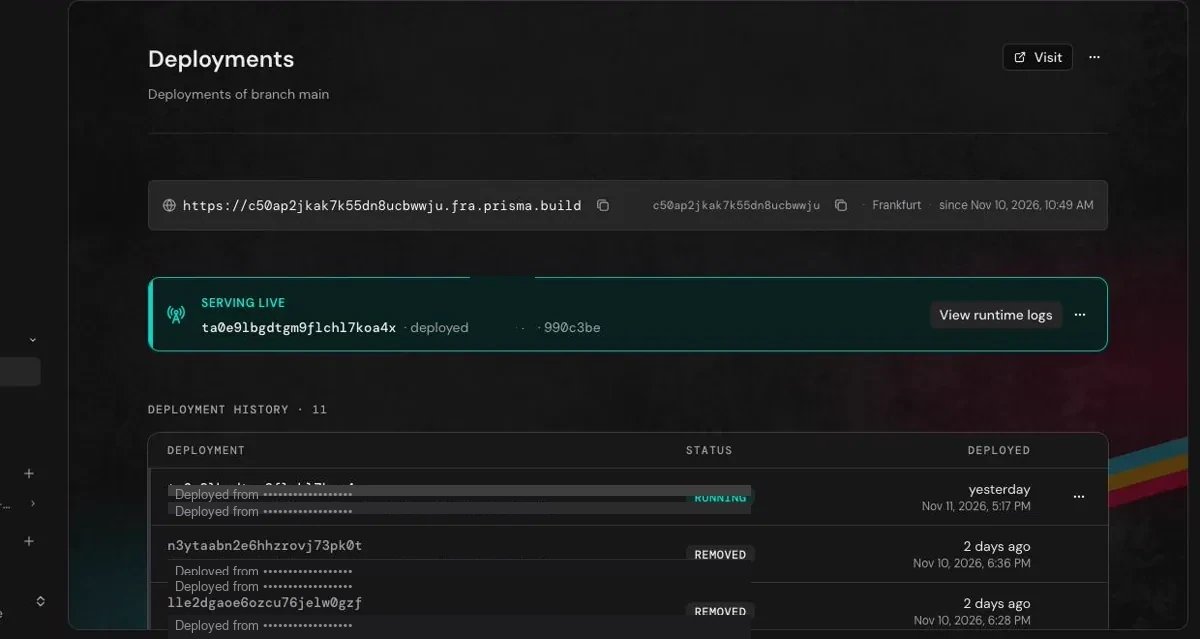
GitHub. Install the GitHub App in the Console, run prisma git connect <repo> --project <name>, and add a deploy workflow to the branches you want deployed. A pushed throwaway branch was live in about 1 minute 57 seconds, with its own fresh database (migrations applied; production data not copied).
Things to know going in
- Prisma 8 is a release candidate. Pin exact versions and install the Prisma 8 skills. Without them, agents invent old APIs (
native_enum,cuid2(), wrong raw-SQL helpers). The skills fix most of it. - Prefer the hosted MCP server. On the RC I used, the plugin's local
prisma mcppath did not start.https://mcp.prisma.io/mcpworked, including Compute logs and deployment tools from the chat. - Cache your hot reads. Prisma bills operations. In my measurements, 3,000 rankings reads cost about 43 operations with the cache on and about 3,010 with it off. Failed requests still use operations too.
- Watch CLI rollback expectations. After a few Composer redeploys,
prisma service version rollbackhad no previous version left to restore (replace cleans up the old build). Plan deploys deliberately; use preview environments for riskier changes. - Point-in-time recovery is not available yet — it is on Prisma's roadmap. Paid plans have daily backups with 7-day retention (30 days on Business).
What it costs
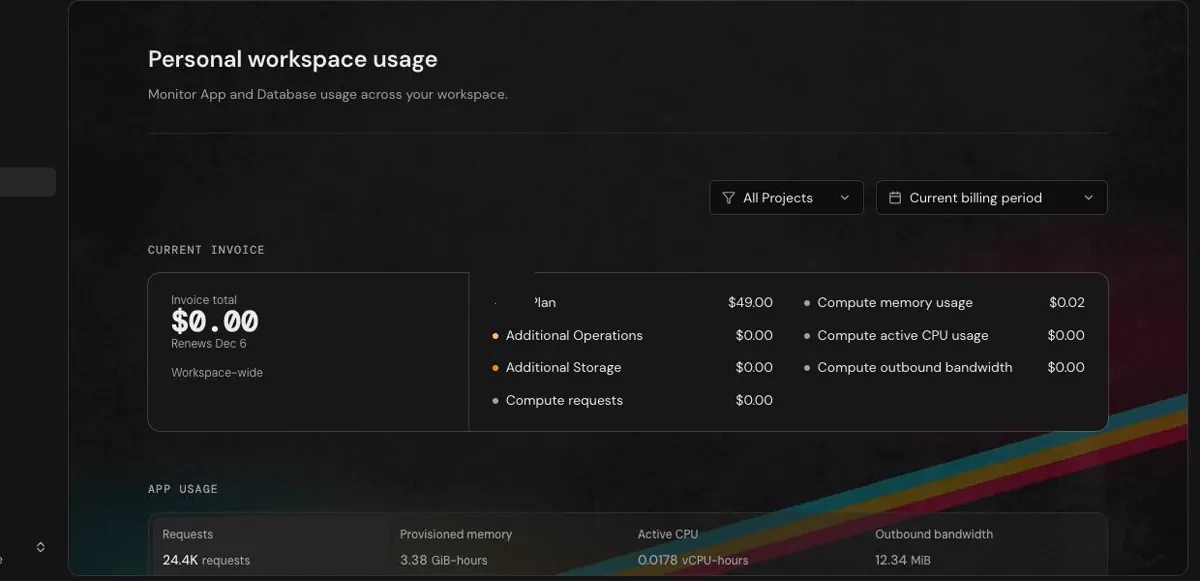
Prisma bills operations (roughly, database requests) plus storage. Prices below are Prisma's list prices, checked on 12 Nov 2026, in USD.
| Plan | Price | DB operations | Storage | Compute requests | Backups | Extra operations |
|---|---|---|---|---|---|---|
| Free | $0 | 200,000 | 2 GB | 1M | none | none, DB stops at the limit |
| Starter | $10/mo + Compute usage | 1M | 10 GB | 5M | daily, 7 days | $8 per 1M |
| Pro | $49/mo + Compute usage | 10M | 50 GB | 20M | daily, 7 days | $2 per 1M |
| Business | $129/mo + Compute usage | 50M | 100 GB | 100M | daily, 30 days | $1 per 1M |
Paid plans include Compute requests only (5M / 20M / 100M). Memory, active CPU and outbound bandwidth are billed from the first unit, so Starter is $10 + Compute usage (and Pro / Business work the same way on top of their base). Rates: $1 per million requests beyond the included allowance, $0.006 per GB-hour of memory, $0.064 per active vCPU-hour, $0.025 per GB of outbound traffic. Idle apps scale to zero and cost nothing.
The honest bill
Here is what the same four days would cost at list prices:
| Plan | Cost for my test | Does it fit? |
|---|---|---|
| Free | $0 | Yes by usage: about 100,000 operations against a 200,000 limit, with Compute and outbound also well inside Free caps. No daily backups. |
| Starter | $10 + Compute usage | Same database usage with room to grow (1M operations) and daily backups. Memory, active CPU and outbound bill from the first unit. |
| Pro | $49 + Compute usage | Far more database headroom than this test needed (10M operations). Same Compute usage model on top of the base. |
The Free plan stops accepting queries when its allowance is used up, so I would not run a real product on it. I show it to size the test, not to recommend it as production.
What my app actually used
I measured billed operations per action on the platform, with nothing else touching the database:
| Action | Billed operations |
|---|---|
| A tool-duel vote | about 5.6 |
| A deck fetch (8 cards) | about 1.0 |
| A rankings read, cached | 0.014 |
| A rankings read, uncached | about 1.0 |
Prisma vs Neon, Supabase, Vercel, Netlify and Clerk
These are not all the same kind of product. Prisma is a database plus an app host. Neon is a database. Supabase is a database plus auth, storage and realtime. Vercel and Netlify are app hosts. Clerk is auth. Prices below are list prices checked on 12 Nov 2026.
| Free plan | First paid plan | Watch out for | |
|---|---|---|---|
| Prisma Postgres + app hosting | 200k operations, 2 GB, 1M Compute requests, no time limit | Starter $10 + Compute usage, Pro $49 + Compute usage | Billed per operation. Paid Compute meters memory/CPU/bandwidth from the first unit. No built-in end-user auth. Prisma 8 is an RC. |
| Neon Postgres | $0: 100 compute-hours and 1 GB per project, scales to zero after 5 min | Launch: pay as you go | Database only; hosting is another vendor. |
| Supabase Postgres + auth + storage + realtime | $0: paused after idle, limited MAU, no backups | Pro from $25 | Point-in-time restore is an add-on. |
| Vercel App hosting | Hobby $0 | Pro $20 per seat | Per seat plus usage. Database is elsewhere. |
| Netlify App hosting | Free $0 | Personal $9 / Pro $20 | Credit-based billing. |
| Clerk Auth | Hobby $0, 50,000 monthly retained users | Pro $25/mo | Auth only. |
The paid floor for "app + database + sign-in"
| Stack | Per month | Covers |
|---|---|---|
| Prisma Starter + Clerk Hobby | $10 + Compute usage | App, Postgres, auth (free tier), daily backups |
| Prisma Pro + Clerk Hobby | $49 + Compute usage | The same with 10M operations and 50 GB |
| Vercel Pro + Supabase Pro | $45 | App, Postgres, auth, storage |
| Vercel Pro + Neon Launch + Clerk Hobby | about $35 | App, Postgres, auth (Neon at its own light-load example) |
Not like-for-like. Prisma Starter is the cheapest floor here when you want app + Postgres on one invoice — remember the Starter base is $10 + Compute usage, not a flat $10. Prisma's own docs point you at Better Auth, Clerk or NextAuth for sign-in — there is no Prisma Auth product for end users.
When Prisma makes sense
Prisma Postgres + Compute
App and database in one project
A TypeScript app (Next.js, Bun, Node) — vibe-coded or a production team build — with Postgres, previews per branch, and a bill that follows usage with a hard cap.
Neon
You only need the database
You already host on Vercel or Netlify and want scale-to-zero Postgres with branching.
Supabase
Batteries included
You want auth, storage, realtime and Postgres in one product.
Vercel or Netlify
Frontend first
You live in their ecosystem and the database can sit elsewhere.
Clerk
You need sign-in
Pair it with Prisma (or any of the stacks above). Free up to 50,000 monthly retained users.
I would reach for Prisma first when:
- You build in TypeScript — from a vibe-coded app through a production team product — and want the app, the database and branch previews in one place, on one bill.
- You want a predictable spend cap and are fine thinking in operations. Cache your reads and the bill stays small.
- You work with AI agents and want them to have their own credentials, with approvals before destructive production actions.
- You want plain Postgres under you (pg_dump exit ramp), not a proprietary data layer.
- You are migrating from Prisma 7 and want to try ORM 8 alongside the existing schema before a full cutover.
- You want preview environments where each branch gets its own fresh database (migrations applied; production data not copied).
When it is not for you
- You need auth, realtime and file storage as one product. Supabase is built for that. With Prisma you add Clerk (or Auth.js / Better Auth) yourself.
- You need point-in-time recovery today. Daily backups are here; PITR is not available yet (on Prisma's roadmap).
- You can't accept a release-candidate ORM. Prisma 8 was still an RC in my test — pin exact versions and expect rough edges until it ships stable.
- Your backend is not TypeScript. Prisma Postgres is still Postgres, but Compute hosts TypeScript apps.
Try it yourself: the five-step setup
Everything below I ran on this project unless it says otherwise.
- Create a Prisma account and set a limit. Sign up here. The Free plan has 200,000 operations a month. On a paid plan, turn on the spend limit in the Console before your first deploy — it is off by default, and you choose the cap.
- Scaffold with the agent skills.
npm create prisma@latest -- --skills claude,cursor,agentswrites the Prisma 8 skill where Claude Code, Cursor and other agents look for it. For a throwaway Postgres with no account,npx create-db@latestis handy for agents. - Add an
AGENTS.md. Cursor and Codex read it natively. For Claude Code, add aCLAUDE.mdthat contains@AGENTS.md. Pin exact versions, prefer the hosted MCP server, and never run a load test without a duration limit or against production. - Connect your agent. Install Prisma's plugin, use the hosted MCP server at
mcp.prisma.io/mcp, and enroll the agent under Console → Settings → Agents so it has its own credentials. - Deploy.
bun run deployran the build and thenprisma deploy: 51 seconds for plan and apply on my first try.
Get the free Prisma + AI agents setup guide
Step by step for Cursor, Claude Code and Codex, plus the full AGENTS.md rules file I used so agents write Prisma 8 code. Enter your email and I will send it.
You'll also join the Vibe Coder's Life newsletter. Unsubscribe anytime.
Verdict
I would put a real TypeScript workload on it, put a cache on every hot read endpoint, turn on the spend limit (off by default), and watch the operations number for a week. Watch the caveats that still matter: no built-in end-user auth, point-in-time recovery not available yet (on the roadmap), and Prisma 8 as a release candidate. If it fits, stay. If you need more later, the exit ramp is plain Postgres.
Related on Vibe Coder's Life
- My vibe coding stack in 2026: where Prisma could sit next to my daily tools
- Free hosting for vibe coding (2026): the free-tier map for the app side
- Free database and storage for vibe coding (2026): Neon, Supabase and friends in detail
- Free auth for vibe coding (2026): the sign-in side to pair with Prisma
FAQ
How much does Prisma Postgres cost?
Four plans at list prices (checked 12 Nov 2026): Free $0 (200k operations, 2 GB), Starter $10 + Compute usage (1M / 10 GB), Pro $49 + Compute usage (10M / 50 GB), Business $129 + Compute usage (50M / 100 GB). Paid plans include Compute requests only; memory, active CPU and outbound bill from the first unit. Extra DB operations: $8 / $2 / $1 per million on Starter / Pro / Business. One vote in my app used about 5.6 billed operations; the whole four-day test used about 100,000.
What happens when I hit the Free plan limit?
The database stops accepting queries until the allowance resets next month, or until you upgrade (Prisma's FAQ). Paid plans have a hard spend limit you set in the Console — it is off by default until you turn it on.
Does Prisma have authentication?
Not a built-in end-user auth product. Prisma Postgres is the database; Prisma Compute hosts the app. Prisma's own docs point at Better Auth, Clerk and NextAuth / Auth.js for sign-in, with user tables living in your Postgres. StackDuel has no accounts, so I did not need it.
Prisma Postgres vs Neon vs Supabase: which should I use?
Prisma if you want the app host and the database in one project. Neon if you only need serverless Postgres next to another host. Supabase if you want auth, storage and realtime with the database. For a TypeScript app — vibe-coded or a production team build — I would try Prisma first and keep Clerk (or Better Auth / Auth.js) ready for sign-in.
Where did the 10,000 votes go?
Into a separate loadtest environment with its own database — not the public production StackDuel URL. The live demo keeps organic visitor votes only, so a low three-digit count there is expected.
Sponsored by Prisma. Try Prisma: prisma.io · Pricing: prisma.io/pricing. Partner links may earn Vibe Coder's Life a reward. List prices in USD change often.
Want your product or app on Vibe Coder's Life? Get in touch.
Questions? Get in touch, or subscribe for the next issue.